For 2024, the annual TFSA contribution limit is $7,000. But that's just this year's piece of the puzzle. The true power of the TFSA is that any contribution room you don't use carries forward, year after year. For anyone who's been eligible since the TFSA launched in 2009, this means their personal limit could be much higher.
Your Quick Reference Guide to TFSA Limits
The Tax-Free Savings Account (TFSA) is one of the best tools for Canadians looking to grow their savings without paying tax on the profits. But since it was introduced in 2009, the yearly contribution limit has changed a few times.
Knowing the specific TFSA limit for each year is key to calculating your total available room. Get it right, and you're set up for tax-free growth. Get it wrong, and you could face stiff over-contribution penalties from the CRA.
How TFSA Contribution Limits Have Evolved
When the government first rolled out the TFSA in 2009, the limit was a straightforward $5,000. Since then, the annual limit has been indexed to inflation and rounded to the nearest $500. This has led to some fluctuations, including a one-time bump to $10,000 back in 2015 before it settled back down. You can get the full story on the TFSA's limit history to see just how much it has changed over the years.
This chart shows some of the key milestones.
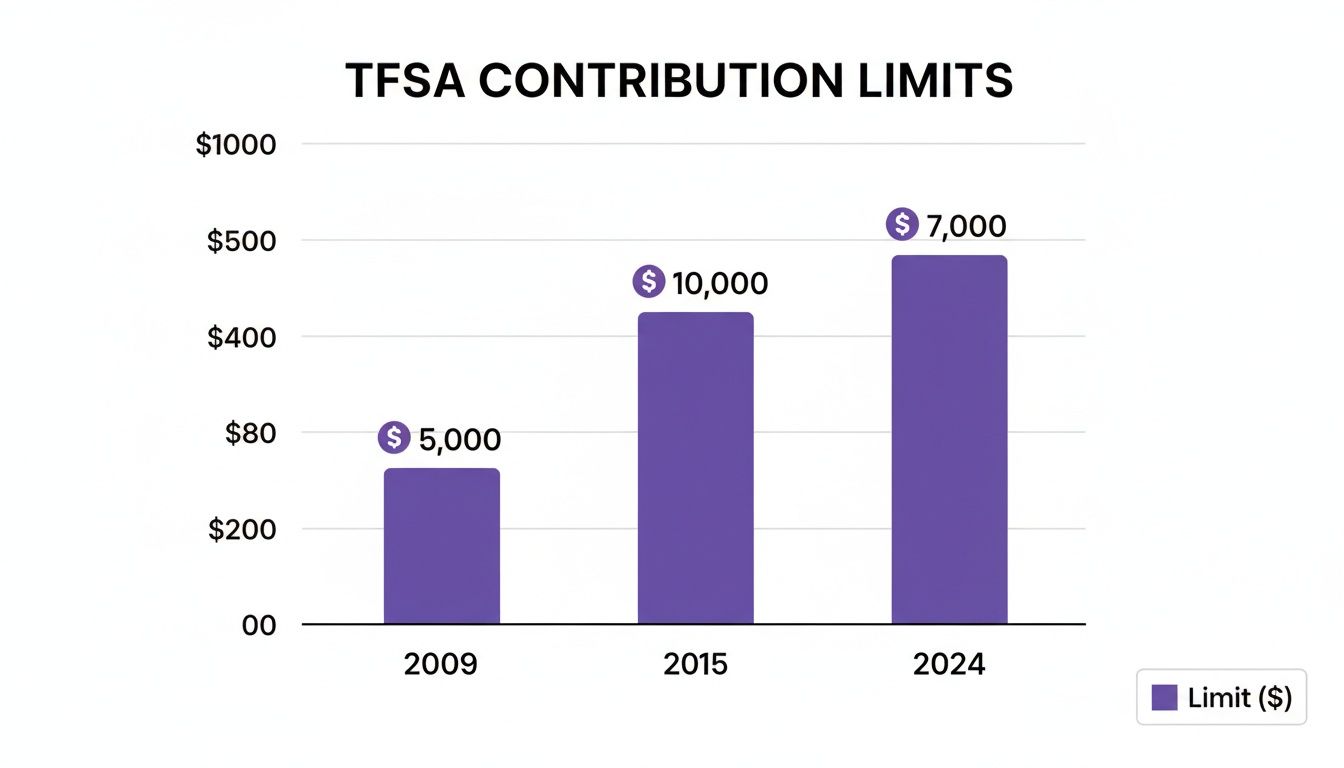
It’s clear how the annual room has adjusted over time, reflecting both economic policy and those inflation-based tweaks. Honestly, keeping track of it all can be a chore. A tool like NeoSpend helps you see your whole financial picture in one spot, making it much simpler to track your contributions and manage your money smarter.
Calculating Your Personal TFSA Contribution Room
The annual TFSA limit is a useful number, but your personal contribution room is what really matters. Think of it as your unique savings capacity, which gets a fresh update every January 1st.
Figuring out this number is simpler than it sounds. It all comes down to a straightforward formula with three key parts. Once you understand how they work together, you'll know exactly how much you can contribute with confidence.

The Three Parts of Your Contribution Room
Your total TFSA contribution room for the current year is the sum of:
- This year's annual limit: For 2024, that’s $7,000.
- All your unused contribution room from previous years: This is the total space you've accumulated since turning 18 (or since 2009, whichever came later) that you haven't used yet.
- Any money you withdrew from your TFSA last year: This is a crucial rule—withdrawals give you back that contribution room, but not until the calendar flips to the next year.
Let’s use an everyday Canadian scenario. Imagine Maya, a new grad in Toronto who has been eligible for a TFSA since 2009 but has never opened one. Her total cumulative room from 2009 to 2024 is a whopping $95,000. If she contributes $20,000 this year, her remaining room for 2024 becomes $75,000.
Key Takeaway: Your personal contribution room is a running total. It’s a mix of this year's limit, all your past unused room, and any cash you pulled out last year.
Trying to track these moving parts in a spreadsheet can be a pain, especially if you have TFSAs at different banks. This is where an app like NeoSpend really shines. It links your accounts to give you a clear, real-time picture of your finances, helping you visualize your contributions so you don't accidentally overdo it. Seeing all your numbers in one place helps you stop juggling statements and focus on growing your savings.
Understanding Withdrawals and Re-contributions
One of the best things about a TFSA is its flexibility. You can pull money out whenever you need it, tax-free. But where many people get tripped up is understanding the rules for putting that money back in. Getting this specific quirk wrong can lead to accidental over-contributions and painful penalties from the CRA.
Here's the one rule you must remember: any amount you withdraw from your TFSA gets added back to your contribution room, but not until January 1st of the next year. That delay is critical. If you take money out and put it back in the same calendar year, you aren't refilling the space you just created—you're either using up new room or, worse, over-contributing.
How Re-contributions Work in Practice
Let’s walk through a common Canadian scenario. Imagine Sarah, from Calgary, has already maxed out her TFSA contributions for the year.
- In June, she withdraws $5,000 for an unexpected home repair.
- By October, she receives a work bonus and wants to put that $5,000 back into her TFSA.
If Sarah puts that $5,000 back in October, she has just made an over-contribution. Why? Because the $5,000 in contribution room from her withdrawal doesn't become available until the calendar flips to the new year.
To follow the rules, Sarah must wait. On January 1st, her new TFSA room will be calculated as the annual limit for the new year plus the $5,000 she took out the previous year.
Keeping track of these details, especially if you have more than one TFSA, can be a headache. This is where NeoSpend makes a huge difference. By consolidating all your accounts, it helps you see your contribution and withdrawal history in one place, so you can plan your re-contributions with confidence and avoid costly mistakes.
Avoiding Costly TFSA Over-Contribution Penalties
It’s surprisingly easy to over-contribute to your TFSA, and when you do, the Canada Revenue Agency (CRA) can hit you with steep penalties. It's a common mistake, but one you definitely want to avoid to keep your tax-free growth on track.
So, what’s the penalty? The CRA charges a tax equal to 1% of the highest excess amount in your TFSA for each month you're over the limit. This tax keeps getting charged as long as the extra cash is sitting in your account, and it can add up fast.
Here's a critical detail: unlike an RRSP, which gives you a $2,000 buffer, the TFSA has zero wiggle room. Every single dollar over your limit is subject to that 1% penalty. In the early days of the TFSA, tens of thousands of Canadians got caught by this rule. You can learn more about these tax-free savings trends to see just how widespread the issue has been.
How Over-Contribution Penalties Add Up
Let's walk through an example. Imagine your total TFSA contribution room for the year is $10,000. In February, you get a bonus and excitedly deposit $12,000, accidentally putting yourself $2,000 over the limit.
If you don't catch the mistake for five months, here’s how the penalty stacks up:
- Penalty per month: 1% of $2,000 = $20
- Total penalty: $20/month x 5 months = $100
While $100 might not seem huge, it completely undermines the tax-free growth you’re trying to achieve. A classic way people get tripped up is by re-contributing a withdrawal within the same calendar year, forgetting that the room only reappears on January 1st of the next year. This is exactly where NeoSpend helps prevent costly mistakes by giving you a clean, consolidated view of your contributions in one place, so you always know where you stand.
Stop Guessing: A Simpler Way to Track Your TFSA with NeoSpend
Let's be honest, tracking your TFSA contributions can feel like a part-time job. You're juggling spreadsheets, logging into different banking apps, and trying to remember every deposit across multiple accounts. It's not just tedious—it's a recipe for a costly over-contribution mistake.
This is where a modern financial tool changes the game. Instead of piecing together your financial puzzle, you can see everything you need in one clean dashboard.
Get the Full Picture of Your Contributions
NeoSpend gives you a complete, up-to-date look at your finances by securely linking all your Canadian bank and investment accounts. For your TFSA, this means you can finally see every contribution you've made in one spot, no matter which bank holds the account.
This consolidated view takes the guesswork out of the equation. You no longer have to wonder if you remembered that deposit from last month. It’s all there, automatically updated and organized, giving you an accurate, real-time snapshot of where you stand.
Let Neo AI Watch Your Back
What really sets NeoSpend apart is the intelligence it brings to your money. Neo AI doesn't just display your data; it actively helps you manage it with proactive insights.
By analyzing your contribution patterns, NeoSpend can send you smart alerts when you get close to your personal limit. This turns the stressful, manual job of tracking your TFSA into a simple, automated process.
Imagine getting a friendly heads-up before you're at risk of going over your limit. This is about more than convenience; it's about giving you the confidence to maximize your TFSA without the anxiety of accidentally crossing the line and getting hit with penalties. You can finally make informed decisions, letting technology handle the heavy lifting so you can focus on growing your savings, tax-free.
Ready to stop guessing and start tracking your TFSA with total clarity? See how NeoSpend can simplify your financial life.
The Bottom Line on Your TFSA
If you remember just a few things about managing your TFSA, make it these. Getting these core rules right is the key to maximizing your tax-free growth and dodging penalties. Think of it as your cheat sheet for smart TFSA saving.
Here's what you absolutely have to know:
Your Personal Limit is Unique: Don't just look at the annual TFSA limit. Your actual contribution room is a running total: this year's limit, plus all your unused room from previous years, plus any money you withdrew last year.
Withdrawals Come Back... Next Year: When you take money out, that contribution space is freed up again, but not right away. You must wait until January 1st of the next year. If you re-contribute that amount in the same year without having enough room, you'll be over the line.
Over-Contributing Hurts: There's no wiggle room. The CRA charges a penalty tax of 1% per month on every dollar you contribute over your limit. That tax keeps adding up until you take the extra cash out.
By 2026, the cumulative TFSA contribution room for someone eligible since the start is on track to hit $109,000—a massive opportunity for tax-free savings. To build out your financial plan, you can discover more insights about TFSA limits and rules.
Honestly, the easiest way to manage all this is to let technology do the work. An app like NeoSpend tracks your contributions for you, so you always know exactly where you stand and can manage your money with confidence.
Common Questions About TFSA Limits
Even when you have the rules down, a few tricky questions always seem to pop up. Here are the most common things Canadians ask about their TFSA limits, with straightforward answers to keep you on the right track.
How Can I Find My Exact TFSA Contribution Room?
The most authoritative place to find your number is your “CRA My Account” portal on the Canada Revenue Agency website. The CRA is the official scorekeeper, tracking the data sent by all your financial institutions.
Just be aware that the CRA’s number isn't always up-to-the-minute. Banks can be slow to report, so transactions from this year might not be reflected until next year. For a truly current picture, you need to track your contributions yourself. That’s where an app like NeoSpend can be a game-changer.
What Happens If I Contribute While I’m a Non-Resident of Canada?
If you move abroad and become a non-resident, you can keep your TFSA, but you cannot contribute to it.
Any money you put in while you're a non-resident gets hit with a penalty tax of 1% for each month it sits in the account. On top of that, you don't earn any new contribution room for any year you are a non-resident for the full 12 months. It’s best to pause contributions until you’ve officially re-established residency in Canada.
Can I Contribute to My Spouse's or Partner's TFSA?
No, you cannot contribute directly to your spouse's or partner's TFSA like you can with a spousal RRSP. The money has to come from them.
However, there’s a simple workaround. You can gift money to your spouse, and they can then use that cash to fund their own TFSA. The best part? Any growth that money earns inside their account is theirs, completely tax-free, with no rules that trace it back to you. It's a great strategy for couples looking to maximize their combined tax-sheltered savings.
Helpful Takeaway: Your personal TFSA limit is more than just this year's number—it’s a cumulative total that includes unused room from the past and withdrawals from last year. Always wait until the new year to re-contribute withdrawn funds to avoid penalties.
Ready to manage your TFSA with total clarity and stop the guesswork? Explore how NeoSpend can simplify your financial life and give you a complete, real-time view of your contributions across all your accounts.