The maximum amount you can put in a TFSA isn't a single, fixed number. It’s a running total that’s been growing every year since 2009. For 2024, the annual limit is $7,000, but your personal maximum is likely much higher. Why? Because any unused contribution room from past years carries forward indefinitely.
Understanding Your Maximum TFSA Contribution Room
Think of your TFSA contribution room as a financial backpack you started carrying the year you turned 18 (or in 2009, if you were already 18). Each year, the government adds a new annual limit into your backpack, creating more space. If you don't use all the space in a given year, it simply stays there waiting for you.
This carry-forward feature is what gives the TFSA its incredible flexibility. There’s no "use it or lose it" pressure, so you can contribute when it makes sense for your budget. It's designed to grow with you over your lifetime, which is what makes it such a powerhouse for building tax-free wealth in Canada.
The Power of Cumulative Contribution Room
The real magic happens on January 1st every year when the new annual limit is added to any unused room you already have. So, even if you couldn’t afford to contribute for a few years, you haven't lost out. That room is still yours.
For example, let's say you turned 18 in 2009, the year the TFSA launched. If you've never contributed a single dollar, your total room will have snowballed to a massive $109,000 by 2026. This is the cumulative maximum—the sum of every annual limit since the program started. The limit began at $5,000 a year, jumped to $10,000 for one year in 2015, and has been steadily increasing since. For more detail, Harvest Portfolios has a good breakdown in their TFSA limit announcement for 2026.
This timeline clearly shows how that contribution potential has grown over the years.
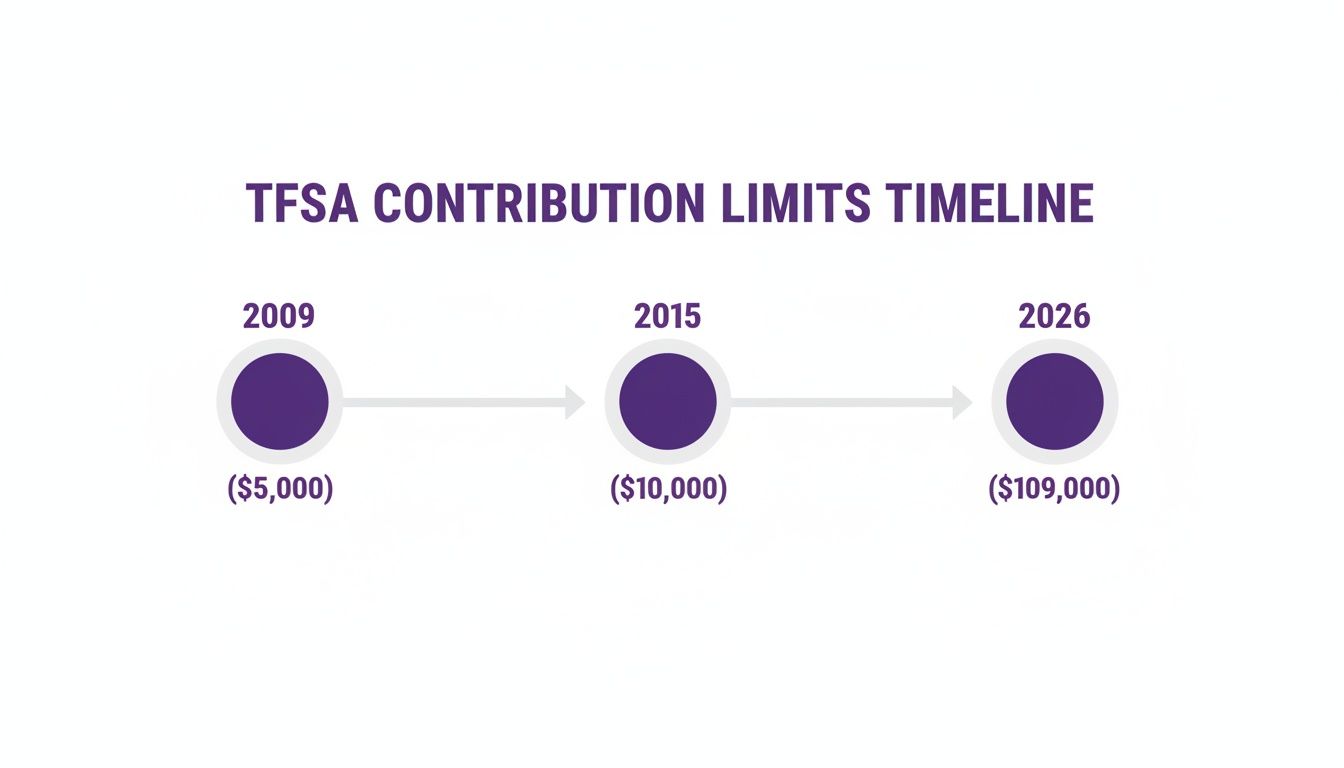
From a modest start, the total room has expanded significantly, giving Canadians a huge opportunity to save and invest tax-free.
Annual TFSA Contribution Limits By Year Since 2009
To figure out your personal maximum, you just need to add up the limits for every year you were eligible (meaning you were 18 or older and a resident of Canada).
To make it easy, here’s a full list of the annual TFSA dollar limits since it all began.
| Year | Annual TFSA Limit |
|---|---|
| 2009 - 2012 | $5,000 |
| 2013 | $5,500 |
| 2014 | $5,500 |
| 2015 | $10,000 |
| 2016 | $5,500 |
| 2017 | $5,500 |
| 2018 | $5,500 |
| 2019 | $6,000 |
| 2020 | $6,000 |
| 2021 | $6,000 |
| 2022 | $6,000 |
| 2023 | $6,500 |
| 2024 | $7,000 |
Just find the year you turned 18 and add up all the limits from that year to the present to find your total room.
Your Personal Contribution Calculation
Things can get a little tricky when you factor in your own contributions and withdrawals over the years.
Here’s the key formula: Your total TFSA room is the sum of all annual limits since you were eligible, minus your lifetime contributions. Remember, any money you withdrew in a previous year gets added back to your room on January 1st of the next year.
If you have TFSAs at different banks, tracking all this can be a real headache. That’s where an app like NeoSpend can be a lifesaver. By connecting your financial accounts, it gives you a clear picture of your contributions in one place. It helps you stay on track and avoid those nasty over-contribution penalties, taking the guesswork out of the equation.
How Your TFSA Contribution Room Is Calculated
Knowing the annual limit is one thing, but truly understanding how your personal contribution room is calculated is the secret to getting the most out of your TFSA. It’s not just a static number the government sets each year—it’s a dynamic figure that shifts and grows based on your own financial moves.
Think of your TFSA room less like a piggy bank and more like a flexible, reusable container for your savings and investments. The amount you can put in gets a fresh calculation every January 1st, and it all boils down to a simple but powerful formula.

The Three Core Components of Your Contribution Room
At the start of every year, your personal TFSA limit gets recalculated based on three key things. This ensures your available space reflects both your past actions and future potential.
Here’s exactly what goes into the mix:
- Unused Room from Previous Years: Any contribution space you didn't use in the past automatically rolls over. You never lose it.
- The New Annual Limit: The fresh limit announced by the government for the current year gets added to your total.
- Withdrawals Made Last Year: This is the part that often confuses people. The full amount of any money you took out in the previous calendar year is added back to your room.
It’s this unique combination that makes the TFSA such an incredibly versatile tool, whether you're saving for a short-term goal or building long-term wealth.
How Withdrawals Power Up Your TFSA Flexibility
The ability to re-contribute money you’ve taken out is a game-changer. Unlike an RRSP, where a withdrawal means that contribution room is gone for good, the TFSA gives it back to you.
Key Takeaway: When you withdraw money from your TFSA, the exact amount you took out is added back to your contribution room on January 1st of the next year. This feature lets you tap into your savings for big life events without permanently shrinking your tax-free investment potential.
For a practical example, let's say you're in Calgary saving up for a down payment. You pull out $40,000 in July 2024 to buy that condo. On January 1, 2025, that entire $40,000 gets added back to your contribution room, on top of the new annual limit for 2025. You can start rebuilding those savings right away.
Putting It All Together: A Real-World Scenario
Let’s walk through an example to see how all these moving parts work for a typical Canadian saver. We'll call her Maya, and she turned 18 back in 2020.
- Starting Point (Jan 1, 2024): Maya kicked off 2024 with $5,000 of unused contribution room from previous years. The new annual limit for 2024 is $7,000.
- Total 2024 Room: That gives her a total of $12,000 for the year ($5,000 unused + $7,000 new limit).
- Her Actions in 2024: She contributes $8,000 in February but then has to withdraw $3,000 in October for an emergency car repair.
- End of 2024: By New Year's Eve, she has $4,000 of unused room for the year ($12,000 total room - $8,000 contribution).
Now, let's figure out her room for January 1, 2025. The Canada Revenue Agency (CRA) has confirmed the annual TFSA contribution limit will remain at $7,000 for 2025. Unused room carries forward indefinitely, which is a massive plus for freelancers or anyone with a fluctuating income. You can learn more about the TFSA limit for 2026 on Wealthsimple.
- Calculating 2025 Room:
- Unused Room from 2024: $4,000
- New Annual Limit for 2025: $7,000
- Withdrawals from 2024: $3,000
- Maya's Total 2025 Room: $14,000 ($4,000 + $7,000 + $3,000)
As you can see, this calculation can get tricky to track on your own, especially if you have TFSAs at more than one bank. This is where a tool like NeoSpend comes in handy. It can help you see all your financial data in one place, making it way easier to monitor your contributions and avoid those costly over-contribution penalties.
The Steep Cost of Exceeding Your TFSA Limit
Staying within your TFSA contribution limit isn't just a friendly suggestion from the government—it's a strict rule with painful financial consequences. While your TFSA is one of the best tools for building wealth in Canada, one simple mistake can have it working against you.
The Canada Revenue Agency (CRA) is serious about over-contributions. If you go over your limit, you'll be hit with a tax of 1% per month on the highest excess amount in your account for that month. It might sound small, but this penalty keeps charging you every single month the extra cash sits in your account, turning an honest mistake into a costly problem.

How Over-Contribution Penalties Work in Practice
Let's walk through a common Canadian scenario. Imagine you have a couple of TFSAs at different banks—one for long-term investments and another for your emergency fund. You get an unexpected bonus at work and, in the excitement, you deposit $3,000 more than your available room without realizing it.
That $3,000 overage immediately starts to cost you. The 1% monthly penalty kicks in, meaning you now owe the CRA $30 for every month that extra money stays put. If it takes you a full year to notice the mistake, you’re looking at a $360 penalty. That’s cash that should have been growing tax-free for you, not going back to the government.
The CRA’s 1% monthly penalty on excess TFSA contributions is relentless. It’s designed to be a strong deterrent, and it keeps accumulating each month until the over-contribution is fully withdrawn.
It's surprisingly easy to lose track, especially if you're juggling multiple accounts or making regular deposits throughout the year. This is why keeping a close eye on your numbers is so important.
What to Do If You Over-Contribute to Your TFSA
That sinking feeling you get when you realize you've gone over your limit is real, but don't panic. There's a clear path to fixing it. The key is to act fast to minimize the damage.
Here are the exact steps you need to take:
- Withdraw the Excess Amount Immediately: As soon as you realize your mistake, pull the exact over-contributed amount out of your TFSA. The penalty clock only stops once the money is out.
- Wait for Your CRA Notice: The CRA will eventually catch on and send you a "TFSA Excess Amount Letter" with a proposed tax bill. This letter will outline what they think you owe.
- File the Right Forms: You'll have to file Form RC243, Tax-Free Savings Account (TFSA) Return, to report the overage and calculate the tax you owe. You'll also need to include Form RC243-SCH-A, Schedule A – Excess TFSA Amounts.
- Pay the Penalty: Once the forms are filed, pay the tax you calculated to the CRA. This will officially close the book on the issue.
Your best defence is keeping your own records. A spreadsheet can work, but it’s still open to human error. This is where a good financial app can be a lifesaver. For instance, NeoSpend links to all your Canadian bank and investment accounts, giving you one clear view of all your TFSA contributions. Its alerts can warn you when you're getting close to your limit, helping you stay on the right side of the CRA and keep your tax-free growth humming along.
How to Find Your Exact TFSA Contribution Room
While doing the math yourself is great for understanding the mechanics, you really need an official number to avoid those gut-wrenching penalties. For that, the only source that truly matters is the Canada Revenue Agency (CRA). They’re the official scorekeepers.
The easiest way to get your number is straight from the source: your CRA My Account portal. Think of it as your personal tax-free savings dashboard, where the government gives you the most up-to-date figure they have on your contribution limit.

A Quick Guide to Finding Your Limit
Never used the CRA portal? No problem. Getting set up is straightforward, and once you’re in, finding your contribution room is just a few clicks away.
Here’s the game plan:
- Head to the CRA Website: Go to the official Canada Revenue Agency site and look for the "My Account for Individuals" login.
- Log In or Get Registered: You can log in using a Sign-In Partner (like your bank) or with a CRA user ID and password. If you’re new, the registration is simple, though you might have to wait for a security code in the mail.
- Find Your Savings Plans: Once you’re on your main dashboard, look for a section called "RRSP and TFSA."
- Check Your TFSA Details: Click on the TFSA link. You’ll see a line item for "TFSA contribution room" for the current year. That’s it—your official limit.
This number is your best guide, but it comes with one very important catch.
Why the CRA Number Isn't Always Up-to-the-Minute
Here’s a pro tip that can save you a world of hurt: the number you see on the CRA website might be stale. Financial institutions—your bank, your brokerage—don't report your TFSA activity in real time. In fact, they usually only send this data to the CRA once a year.
This means a contribution you made in February might not actually appear on your CRA My Account until the following year. Since the TFSA was introduced on January 1, 2009, this reporting cycle has been a common source of confusion. The CRA does a great job tracking your cumulative room, but it’s best to log in after April each year to get the most accurate picture of the previous year's contributions. You can learn more about how TFSA limits have evolved since inception from Edward Jones.
Because of this reporting lag, the CRA number is a fantastic starting point, but you must also track your own contributions throughout the year. Relying solely on the CRA’s figure without accounting for your recent activity is a classic mistake that can easily lead to over-contributing.
This is especially true if you have TFSAs at more than one bank. To get a real-time total, you need a single view of all your accounts. An app like NeoSpend is a lifesaver here. It connects to your accounts and pulls everything into one dashboard, giving you an accurate, up-to-the-minute picture of where you stand and helping you avoid going over your maximum amount in your TFSA.
How to Maximize Your TFSA (and Avoid Over-Contributing)
Knowing the rules for your TFSA is a great start, but how you apply them is what really builds wealth. Let's move from theory to practice and look at some actionable strategies to help you grow your savings confidently while steering clear of common mistakes.
One of the simplest—and most powerful—things you can do is automate your contributions. Set up a recurring transfer that lines up with your paycheque. This 'set it and forget it' approach turns saving into a habit, ensuring you're steadily building that tax-free nest egg without even thinking about it.
The Trouble with Manual Tracking
Automating works beautifully, but life gets complicated. Plenty of Canadians have more than one TFSA account. Maybe you have a high-interest TFSA for your emergency fund at one bank and a self-directed TFSA for your investments at another.
While there's nothing wrong with having multiple accounts, it makes tracking a headache. When you're juggling contributions across different institutions, it's incredibly easy to lose sight of your overall limit. Relying on memory or a spreadsheet you forget to update can quickly lead to an accidental over-contribution—and that dreaded 1% monthly penalty from the CRA.
A Smarter Way to Stay on Track
This is where getting a single, clear view of your finances becomes a game-changer. You need to ditch the guesswork and have one source of truth that shows you exactly where you stand at any given moment.
By linking all your financial accounts to a single dashboard, you eliminate the guesswork and manual effort. This consolidated view empowers you to see your complete financial picture, including all TFSA contributions, in one secure place.
This is exactly how modern financial tools are helping Canadians get a better handle on their money. For instance, when you connect your accounts to NeoSpend, you get a complete overview of your financial life. The app provides a unified dashboard that securely syncs with your Canadian bank and investment accounts, showing you every dollar you've put into your TFSAs, no matter which bank they're with.
Using Smart Alerts to Avoid Penalties
A consolidated view is powerful, but getting a little help before you make a mistake is even better. The real advantage comes from tools that don't just show you data but help you act on it. Imagine getting a heads-up before you make a costly error.
This is where an app like NeoSpend really shines. The built-in Neo AI keeps an eye on your financial activity and can be set up to watch your TFSA contributions.
- Proactive Notifications: As you get closer to your maximum amount in tfsa, Neo AI can send you a smart alert. It's a simple, timely notification that gives you a clear warning, so you can adjust your contributions and avoid accidentally stepping over the line.
- Real-Time Clarity: The CRA portal is useful, but its data can be months out of date. NeoSpend gives you an up-to-the-minute look at your contributions, so the information you’re basing decisions on is always current.
- Peace of Mind: With automated tracking and intelligent alerts, you can stop worrying about tedious calculations and focus on your investment strategy. It helps you maximize your tax-free growth without the constant fear of making an expensive mistake.
By using these strategies and tools, you can navigate the rules with confidence, avoid penalties, and get the most out of this incredible wealth-building account.
Putting It All Together for Smart, Tax-Free Growth
Alright, let's wrap this up with a clear action plan. Getting a handle on your TFSA contribution room is your ticket to using one of the best wealth-building tools available to Canadians. By now, you know the drill: your limit grows each year, withdrawals get added back the following year, and going over the line comes with some pretty nasty penalties.
The most important takeaway is that you're in the driver's seat. Your journey toward real, tax-free growth starts with two simple moves: find out your official number, then keep a close eye on it.
Your financial future is built on the small, smart decisions you make today. Checking your official TFSA limit and tracking your contributions aren’t just chores—they're the bedrock habits of successful tax-free investing.
Two Simple Steps to Take Control
Ready to move forward with confidence? Just focus on these two actions:
- Get Your Official Number: Before you do anything else, log in to your CRA My Account. This is the only place to get the government's official, final word on your personal contribution room. No guessing games.
- Track in Real-Time: Don't get caught out by old data. Use a modern tool to watch your contributions as they happen, which is a must if you’re juggling more than one TFSA.
This is exactly where an app like NeoSpend can be a game-changer. Once you link your accounts, it gives you one clean, up-to-the-minute dashboard showing every dollar you put in. NeoSpend helps you see how close you are to the maximum amount in your TFSA without you having to track it all in a spreadsheet, and it can even send you a heads-up to stop you from making a costly over-contribution mistake.
Take these steps today. It's the clearest path to managing your money with confidence and building a more secure financial future.
A Few Lingering Questions About TFSA Limits
Once you’ve got the basics down, a few tricky situations always seem to pop up around the maximum amount you can have in a TFSA. Let’s walk through the most common ones so you can manage your account with total confidence.
Getting these details right can make a huge difference, especially when you’re dealing with family finances or a volatile market. Knowing the ins and outs is the key to avoiding penalties and getting the most out of this incredible account.
Can You Contribute to a TFSA Before Turning 18?
This one’s a hard no. You only start building up TFSA contribution room on January 1st of the year you turn 18. Any money put in before your 18th birthday is considered an over-contribution by the Canada Revenue Agency (CRA).
This means the dreaded 1% monthly penalty tax will be charged on any funds you deposit before you're legally old enough. It's an easy mistake for well-meaning parents or grandparents to make, but the rules are ironclad. The smartest move is to wait until the 18th birthday actually arrives before making that first deposit.
Can Spouses Share or Combine Their TFSA Room?
TFSA contribution room is yours and yours alone. You can't share it, transfer it, or combine your personal limit with your spouse or common-law partner. Each of you gets your own room to accumulate and use, based on your own age and residency status.
However—and this is a big one—there’s a popular and completely legal strategy that Canadian couples use to supercharge their household's tax-free growth.
- Gifting Funds: One spouse can simply give money to the other. That spouse can then contribute the cash to their own TFSA.
- No Attribution Rules: This is the magic part. Unlike with regular investment accounts, the CRA’s spousal attribution rules don’t apply here. Any investment income or growth earned on the gifted money belongs to the recipient, completely tax-free. The spouse who gave the gift has zero tax consequences.
This is a fantastic way for a higher-income earner to help their partner max out their TFSA, essentially doubling what the household can save and grow tax-free.
Gifting money for a spouse to contribute to their TFSA is one of the simplest and most powerful financial planning moves a Canadian couple can make. It lets you use both partners' contribution limits to the fullest, getting you to your shared financial goals that much faster.
Do Investment Gains or Losses Affect My Contribution Room?
This is probably the most important—and most powerful—rule of the TFSA. The answer is a resounding no. What happens to your investments inside the account has absolutely zero effect on your contribution room.
This is a massive perk for long-term investors. Let’s break it down with two quick examples:
- A Big Win: You put in $6,000, and your investments do incredibly well, growing to $20,000. If you decide to withdraw that entire $20,000, the whole amount gets added back to your contribution room next year. You’ve basically created an extra $14,000 of tax-free space out of thin air.
- A Disappointing Loss: You contribute $6,000, but the market takes a nosedive and your investment shrinks to $4,000. If you withdraw that $4,000, only $4,000 is added back to your room next year. That original $2,000 of contribution space is gone for good.
This rule really highlights why a solid, long-term investment strategy is so critical for your TFSA. The chance to permanently grow your contribution room is one of the account's best features. And while keeping track of all these moving parts can feel like a chore, an app like NeoSpend makes it simple. It helps you see all your contributions in one place so you can stop worrying about the rules and focus on your strategy.
Key Takeaway: Understanding your personal TFSA limit is the first step toward smart, tax-free investing. Check your official room on the CRA website, track your contributions in real-time to avoid penalties, and consider automating your savings to stay on track.
Take control of your finances and make tax-free growth simpler. Get a unified view of your TFSA contributions and stay on top of your limits with NeoSpend. Explore how NeoSpend can help you manage your money smarter.